![TinyBull Logo Redesign-65.png]](https://support.tinybull.com/hs-fs/hubfs/TinyBull%20Logo%20Redesign-65.png?height=40&name=TinyBull%20Logo%20Redesign-65.png)
Note: These instructions will only work if you have a company Linked In page.
1. Access your Super Admin Page View.
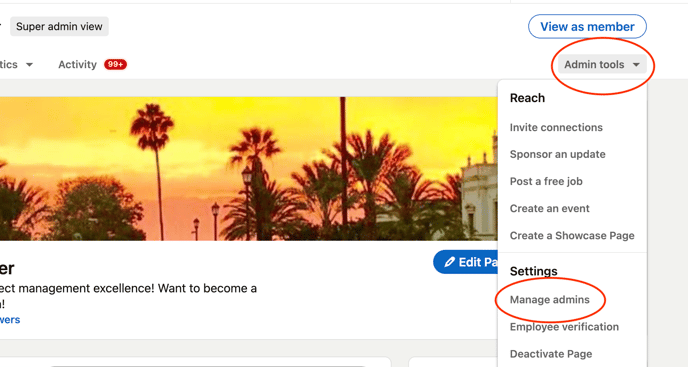
2. Click the Admin tools dropdown at the top of the page and select Manage admins.
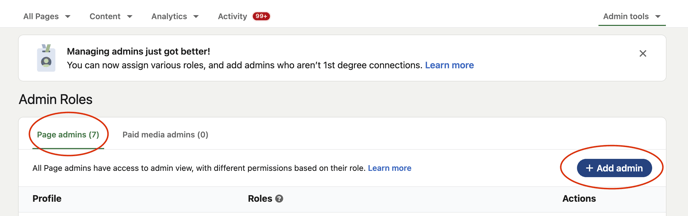
2. Make sure you are on the Page admins tab and click Add admin.
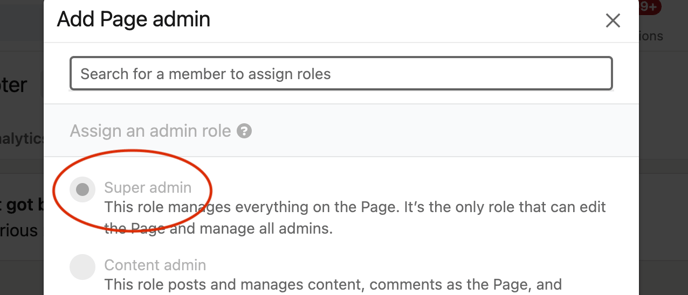
3. Type in the name that you need to add and make sure Super Admin is selected.
4. Repeat steps 2 & 3 to add another Super Admin.